![StayWatch White.svg]](https://staywatch.ai/hubfs/staywatch/logos/StayWatch%20White.svg)
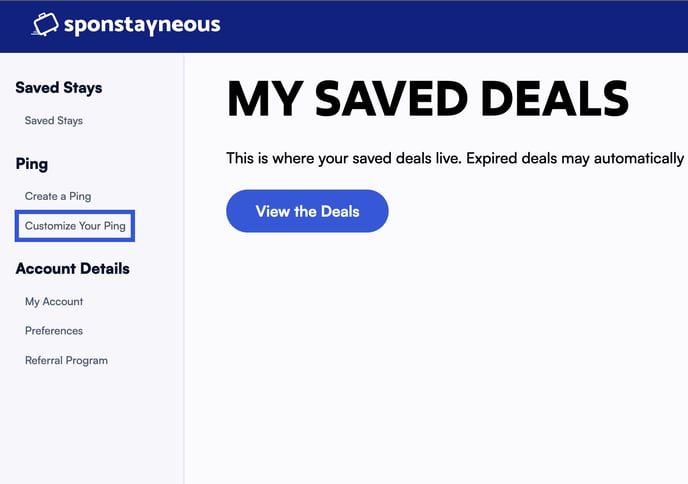
To customize your existing Ping widgets:
- Log in to your Sponstayneous Account
- In the left sidebar under Ping, click "Customize Your Ping"
 ---
---
Please Note: before customizing your Ping widget, please make sure you've selected the correct Listing from the "Select Listing" dropdown.
---
The following options are available for customizing your Ping widget:
- Positioning: choose whether you want the widget to load in the bottom right or the bottom left of your website.
- Color: choose the color of the Ping icon and the background color of the widget once clicked.
- Font: choose the font used for the copy of the Ping widget.
- Preview Text: write the preview text of the ping widget before the visitor clicks on it.
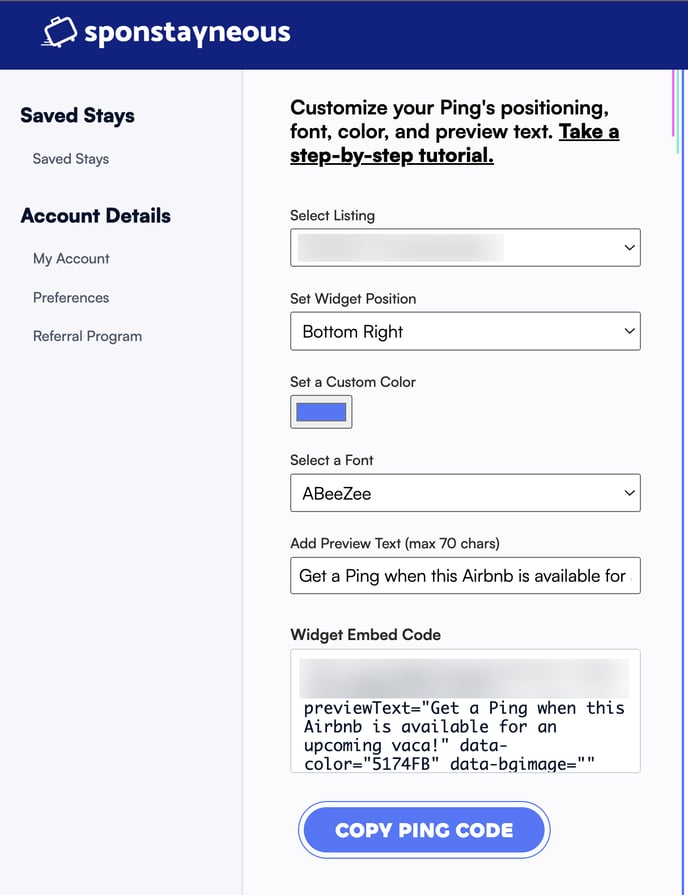
After finishing your customization options, click on Copy Ping Code at the bottom and embed the code on your listing's website.